

Roles and Permissions
The roles and their permissions follow the life cycle of processes: each role takes on a part of the work on them.
Every role stands for a part of the work on processes: managing processes and users, creating, being responsible for, executing and releasing processes.
Roles
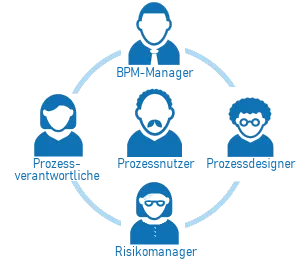
Functions are tailored directly to the acting user roles
-
BPM Manager
Only a Designer can become a BPM Manager. This is defined in the account administration or in the Process Space by another BPM Manager. With Bpanda, BPM Managers organize and manage the process landscape and the organizational structure of the company. BPM Managers keep track of important topics such as quality assurance and compliance. BPM Managers have access to all versions of all processes as well as to the dashboard for risk management and can release risk analyses.
-
Designers
In the account administration, Designers are given the permission to import processes and design them with the integrated Modeler — the Bpanda license alone does not allow this. Designers have access to all versions of all processes and can view released risk analyses via the Guide.
Only Designers can be added as additional BPM Managers in the Process Space. See Defining Designers and BPM Managers.
-
Process Owners
Process Owners are responsible for the content of their processes and implement them. They assign the roles in the process and manage the attachments (documents and links). Which responsibility a Process Owner has in this process, for example professional or technical, is defined by Process Owners and BPM Managers. The responsibilities come from a list maintained by the BPM Manager.
They develop and improve their processes together with the interested parties, for example by carrying out release processes with reviews.
For their processes, they can record and assess risks and opportunities in risk analyses. To do so, they define controls and responsibilities. They can view all recorded risk analyses.
-
Process Contributors
Process Contributors support the Process Owners with their professional expertise. They have access to all process versions and can also manage attachments. For Process Contributors, too, Process Owners and BPM Managers define which responsibility they have in this process.
-
Process Users
Process User is not a special role. Every user of Bpanda is a Process User and can generally see all processes in the valid version and – if available – in the version that has already been released but is not yet valid, as well as the attachments (documents, links, videos) belonging to them.
Regardless of prior knowledge, the process content is intuitive to find and presented in an understandable way.
Everyone can ask questions, see all answers and use other standard functions.
Process Users can view released risk analyses via the Guide.
-
Process Participants
Process Participants have been explicitly assigned to one or more processes. These processes appear for the Process Participant under “Relevant Processes” in the respective valid version. They are automatically notified of changes to these processes, see When You Receive Which Notification.
-
Review Owners
Review Owners manage and carry out their reviews. They assign the roles in the review process, obtain the feedback of the Review Participants and organize the release workflow.
-
Review Participants
Review Participants have been explicitly assigned to one or more reviews. They take part in reviews of processes and are notified about them. They see the version they are reviewing even without a further role in the process, and also after the review has ended.
-
Owners of Architecture Elements
Owners are assigned to a single architecture element — as a user, group, organizational unit or organizational role. For this element they may do what is otherwise reserved for BPM Managers and Designers: edit and publish it, discard its draft, show and hide it, link it and add further owners. They cannot create new architecture elements, import from ArchiMate®, export to ArchiMate® or publish all drafts at once.
For architecture elements of the type Business Process, the Process Owners of the associated process count instead.
-
Risk Managers
Risk Managers are responsible for addressing the opportunities and risks of processes in the Process Space, have access to the dashboard for risk management, can view all recorded risk analyses and release them for all Process Users.
Permissions
For certain areas, Bpanda manages various permissions that are linked to certain roles.
Processes and Process Maps
| Functions | Users | Participants | Contributors | Owners | Designers | BPM Managers | Review Owners | Review Participants |
|---|---|---|---|---|---|---|---|---|
| Navigate and search | ✓ | ✓ | ✓ | ✓ | ✓ | ✓ | ✓ | ✓ |
| See valid process version | ✓ | ✓ | ✓ | ✓ | ✓ | ✓ | ✓ | ✓ |
| See released process version that is not yet valid | ✓ | ✓ | ✓ | ✓ | ✓ | ✓ | ✓ | ✓ |
| See attachments | ✓ | ✓ | ✓ | ✓ | ✓ | ✓ | ✓ | ✓ |
| Questions and answers | ✓ | ✓ | ✓ | ✓ | ✓ | ✓ | ✓ | ✓ |
| See all process versions | ✓ | ✓ | ✓ | ✓ | ||||
| Import and manage process versions | ✓ | ✓ | ✓ | |||||
| Initially import and manage processes | ✓ | ✓ | ||||||
| Design and add processes | ✓ | ✓ | ||||||
| Manage process landscape and organizational structure | ✓ | |||||||
| Manage attachments | ✓ | ✓ | ✓ | ✓ | ||||
| Assign roles (except review roles) | ✓ | ✓ | ||||||
| Block view of process | ✓ | ✓ | ||||||
| Relevant Processes / automatic notification | ✓ | ✓ | ✓ |
Reviews
| Functions | Users | Participants | Contributors | Owners | Designers | BPM Managers | Review Owners | Review Participants |
|---|---|---|---|---|---|---|---|---|
| Manage and release review version | ✓ | ✓ | ||||||
| Assign review roles | ✓ | ✓ | ||||||
| See and comment on review version | ✓ | ✓ | ✓ | ✓ | ||||
| Assess review version | ✓ | |||||||
| Reviews / automatic notification | ✓ | ✓ |
Risk Management
| Functions | Users | Participants | Contributors | Owners | Designers | BPM Managers | Risk Managers |
|---|---|---|---|---|---|---|---|
| See released risk analyses via Guide | ✓ | ✓ | ✓ | ✓ | ✓ | ✓ | ✓ |
| Record and assess opportunities and risks | ✓ | ✓ | ✓ | ✓ | |||
| Save templates for opportunity or risk | ✓ | ✓ | ✓ | ✓ | |||
| Define control and responsibility | ✓ | ✓ | ✓ | ✓ | |||
| See all recorded risk analyses | ✓ | ✓ | ✓ | ✓ | |||
| Use risk management page | ✓ | ✓ | |||||
| Manage templates for opportunity or risk | ✓ | ✓ | |||||
| Release risk analyses | ✓ | ✓ |